
Your apps stop being five separate apps.
Included on every plan, and on every free trial from day one.
A deal is won on Friday. Somebody has to remember to open Tasks and raise the kickoff, open Invoicing and raise the first invoice, open Tickets and start the onboarding thread. Write it as one rule instead, and see exactly what it would have done before you switch it on.
- One rule, any two of five apps
- Preview against your own records
- A loop is refused, not billed
Run it against your own records first. Nothing is created.
Every automation tool can turn a sentence into a workflow. The question that actually stops people switching one on is what it will do to the records they already have. Answer that before they commit, in plain English, against their own data.
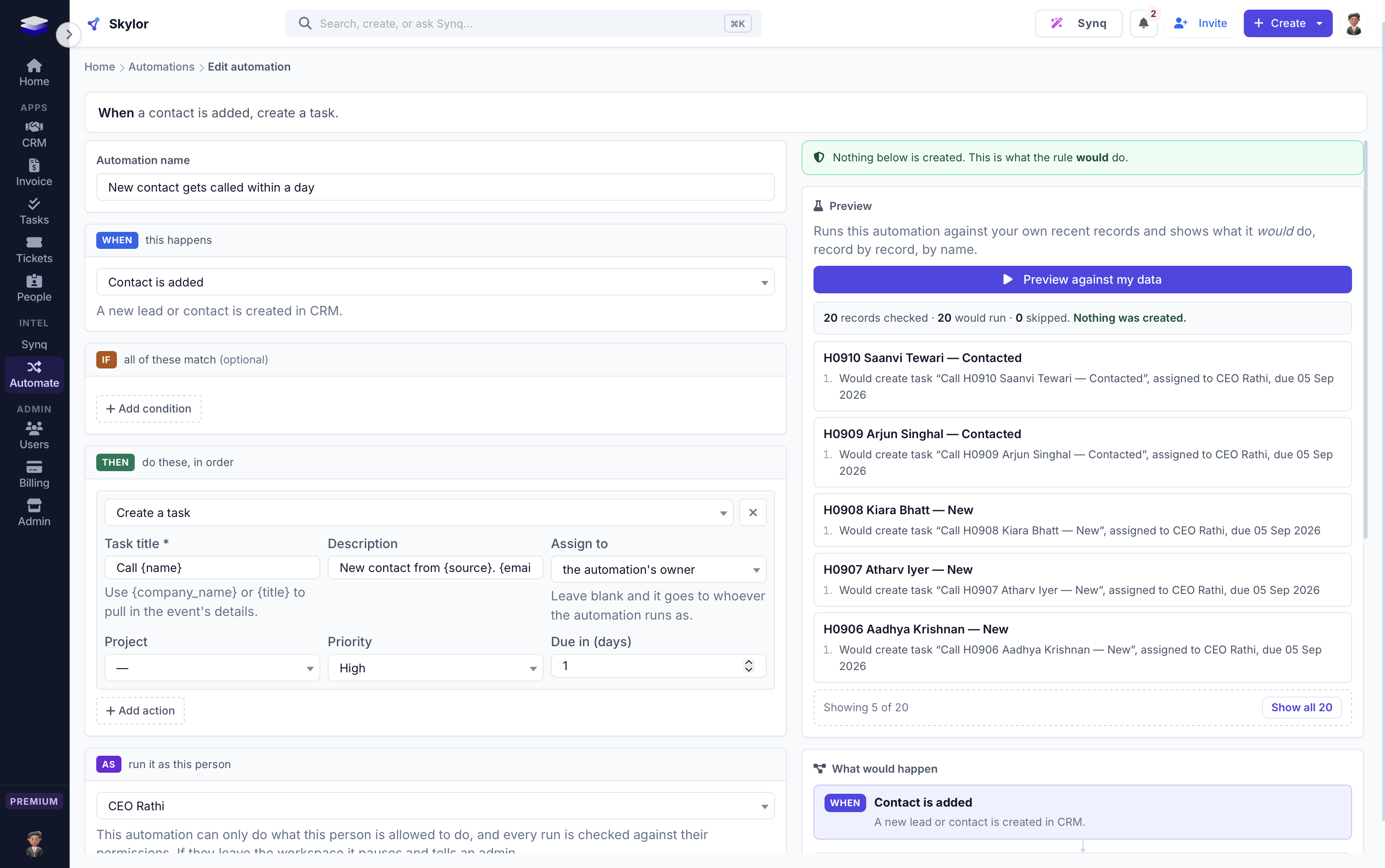
It says what it would have done
Against your last records, rule by rule: this task, assigned to this person, due this date. This draft invoice, for this amount. Named, not summarised.
Nothing is created
The dry run and the real run are the same code path with one switch. A test asserts a preview writes nothing, both in the engine and through the real endpoint.
The invoice is a draft, always
No action in the catalogue can send an invoice, mail one or take a payment. It is enforced in code: a test fails if any future action even looks like it moves money.
A plain-English summary, live
As you build, the panel restates the rule as a sentence. If the sentence is not what you meant, the rule is not what you meant.
When this happens, if these hold, do these things.
One grammar, and the things it does may be in any app. A rule names a real person it runs as, and their permissions are checked when you save it and again on every single run, so an automation can never create something its owner could not have created by hand.
You are never given a blank page
Six starter automations, each one complete, built from the events and actions your workspace already has, and each one previewable before it is switched on. Pick one and you land in the builder pre-filled.
A loop is refused, and the other rule is named
Save a rule that would close a loop and we say which rules form it. Competitors let it run until your monthly quota is gone; the big platforms crash at a nesting limit and tell you nothing useful.
A half-finished run is visible and fixable
Every step is recorded separately, retryable separately, and a retry cannot create the same thing twice. Most tools give you a red row in a log.
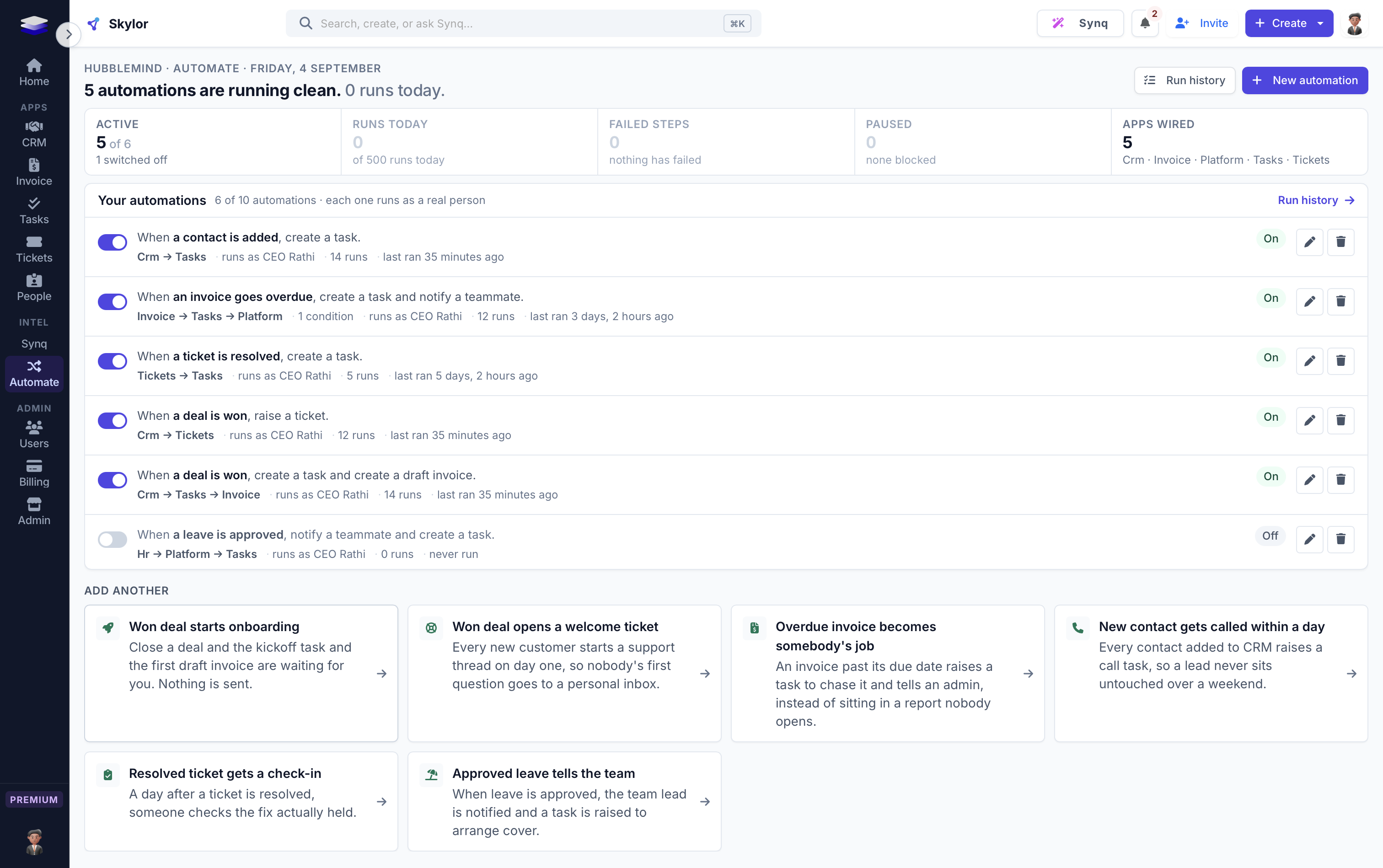
The rules it runs under, in plain words.
The useful thing to know about an AI feature is what it is not allowed to do. These are enforced in code, not in a policy page.
Twelve things it notices. Eight things it does.
Across every app, from one rule. Adding a sixth app to Skylor adds two files and this list gets longer; it is not an integration layer that has to be rebuilt.
CRM
WatchesDeal won · deal lost · deal changes stage · contact added
DoesTag the contact · move the deal
Tasks
WatchesTask completed · task created
DoesCreate a task
Invoicing
WatchesInvoice paid · invoice created · invoice overdue
DoesCreate a draft invoice
Tickets
WatchesTicket raised · ticket resolved
DoesRaise a ticket
HR Lite
WatchesLeave approved
DoesNone yet, deliberately
Platform
WatchesConditions on any field the event publishes
DoesNotify a teammate · send an email · call a webhook
Built for how a real team works.
Inside the product, not bolted to its API
The five apps share one database and one permission model, so a rule that spans them cannot become a way around who is allowed to see what. The alternative is a second subscription and an integration to maintain.
It tells you what to automate
Synq notices you have created a task seven times when an invoice was created, says so with the count, and offers the rule. The count is measured from your own records, never generated.
Automation cannot outrank permissions
A rule is as powerful as the person it runs as, and no more. There is no system account, and the run history says who.
The things people ask first.
Do I need Zapier or a second tool?
Not for anything inside Skylor. Rules run between CRM, Tasks, Invoicing, Tickets and HR Lite natively. There are no third-party connectors, so a workflow that has to reach an outside product still needs one. The 'call a webhook' action sends events out; nothing comes in.
Can an automation send an invoice or charge a customer?
No, and it is not a setting. Nothing in the catalogue can send, mail or take payment. Invoices are written as drafts and a person reviews and sends them.
What happens if I build a rule that loops?
It is refused when you save it, and we name the rules that form the loop. If a chain does start, it terminates on its own rather than running until your quota is gone.
Is it on my plan?
It is on every plan, including the entry plan, and on every free trial from day one. 3 automations during the trial, 3 on Basic, 10 on Premium, uncapped on Custom.
Can I see what a rule would do before turning it on?
Yes, and it is the point. Preview runs the rule against your own recent records and says in plain English what would have happened to each one. Nothing is created.
Cross-App Automator is one of 8. They work as one.
One login, one bill, one rate. Every app included, on every plan.
Write the rule once. Stop remembering it every Friday.
Every app is on every paid plan. Start free for 14 days, no card.